
If you have just received your PIC system Station and are using it for the first time, take a look at the Getting started article for more information on the system's parts.
- If your PIC system Station is not mounted on a wall or attached to a dental chair, set it down on a stable surface or your preferred cart to ensure it remains secure during use.
- You can use your PIC system Station either while connected to a power source or on battery power. If you choose to use it unplugged, keep in mind that the QuickSwitch battery can provide up to 2 hours of use before needing to be recharged.
- If you want to connect your PIC system Station to a power source, get the AC cable. If you are using the optional wheeled case, it will be stored in one of its compartments.
- Find the AC power port on one side of the PIC system Station and connect one end of the AC cable to the power port. Then, plug the other end into a nearby power outlet.
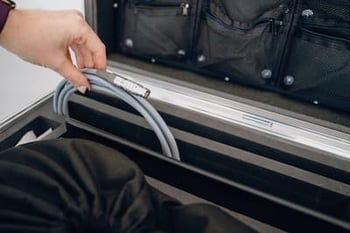
- Get the camera cable. Find the PIC camera port on the same side as the AC power port, and connect one end to the PIC system Station and another end to the PIC camera.
- To connect the camera cable, first align the red dot on the cable to the red dot on the connector of the PIC system. Do not apply force to the cable and avoid bending the cable excessively.
Then, carefully push the camera cable's connector into the PIC system's connector until you hear a click sound that will confirm it is fully connected.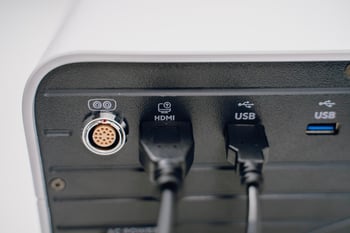
- If you plan to use your PIC system Station with the portable touchscreen provided by PIC dental, locate the HDMI and USB cables for the touchscreen. Connect them to the touchscreen and the designated ports on the side of the PIC system Station. Read this article to learn how to use your PIC system Station with the included portable touchscreen.
- After securely connecting all cables, or just the AC and PIC camera cables if you are not using the touchscreen, power on the system by pressing the ON/OFF button located on the front side of the PIC system Station.
- PIC system Station is now ready for capture.
- To disconnect your PIC system Station, follow the instructions in this article to retrieve the cables and learn how to turn off your system safely in this other article.
If this is your first time using a PIC system, learn more about setting up and capturing a new case in PIC suite.