
What is PIC system Station?
PIC system Station is the smallest version of PIC system. Similar to the other available formats, including PIC system and PIC system Gravity, PIC system Station integrates with PIC camera and PIC suite software, providing highly accurate implant captures.
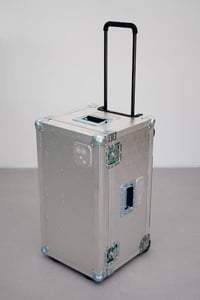
PIC system Station is the most compact and lightweight PIC system format. It facilitates easy installation on dental chairs and walls, while also catering to users that travel often, as PIC system Station can be transported in an optional wheeled suitcase.
Compatibility of PIC system Station
- PIC camera Legacy (Released in 2010). PIC system Station is available as a form factor upgrade for PIC system Legacy owners.
- PIC camera (Released in 2022)
Unboxing and initial setup of PIC system Station
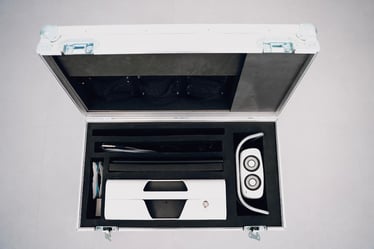
PIC system Station is delivered on its own or in a wheeled metal travel suitcase that you can add to your order. Both options include PIC system Station, a PIC camera, and a portable touchscreen. The optional suitcase is designed to store and protect all the components during transport.
Initial setup of PIC system Station
- If you receive it with the flight case, open it by flipping and rotating the two latches on the front.
- Remove all components from the case.
- Follow these instructions to set your PIC system Station for capture.
- Install your PIC transfer kits in PIC suite by following these instructions.
Features and parts of the system
PIC system Station includes a number of features and components, some of which are tailored to this form factor. The key elements of the system are:
Unique to PIC system Station:
Available for both PIC system Station and PIC system:
- Wheeled travel suitcase (optional)
Available on all formats: PIC system, PIC system Station and PIC system Gravity:
- QuickSwitch Power (2-hour battery)
- Ports (one AC power, 1-3 USB ports, one HDMI port, and a camera cable port)
Features
Screenless compact design
PIC system Station is the only screenless PIC system format, making it more portable, compact and versatile for using in different setups or even in several locations.
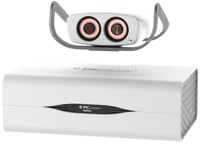
Its compact dimensions and lightweight design make it ideal for convenient travel in the optional wheeled case with effortless mobility between different locations.
- Weight: 13.2 lbs / 6 kg
- Dimensions: 39 × 13.5 × 25 cm (length x width x height)
VESA mounting points
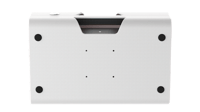 The back of PIC system Station is equipped with standard VESA holes (75 × 75 mm), providing versatile installation options to suit your needs—whether you prefer a permanent setup (on the wall or dental chair) or mobility (on a counter or cart).
Follow the instructions on How to set up your PIC system Station to learn the kind of VESA mount you'll need for attaching your system to the wall or dental chair.
Portable touchscreen
This component of PIC system Station is an external compact touchscreen monitor, requiring minimal space on your counter or cart.
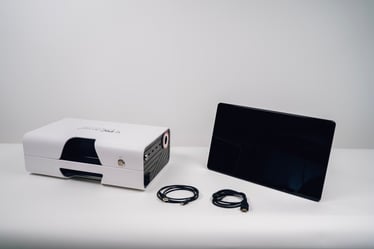
Its design allows it to fit seamlessly within the optional wheeled suitcase, enabling you to pack all components efficiently and without any hassle.
Check the article about How to use PIC system Station with the portable touchscreen to learn how to connect both devices.
QuickSwitch Power
QuickSwitch Power is an advanced internal power supply unit equipped with a backup battery, providing PIC system Station with a battery life of up to 2 hours.
This feature is specifically designed to enable PIC system Station to remain operational when it is unplugged from AC power, allowing for capturing on battery without AC power and seamless room changes. If the system is unplugged while powered on, QuickSwitch Power automatically activates, ensuring that the system continues to run on battery power.
Once you reconnect PIC system Station to AC power in a new location, it switches back to AC power and charges the internal battery, streamlining your workflow without interruption.
Ports on the PIC system Station
Located on one side of PIC system Station, you will find six ports for connecting the system to external components, as well as for powering and charging the device:
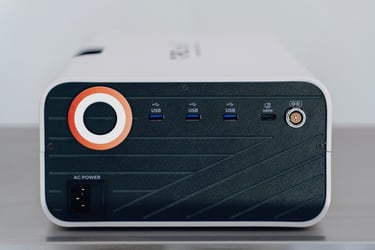
- One AC power port
- Three USB ports
- One HDMI port
- One port for connecting the PIC camera