
The two-step strategy demonstrated during the PIC pro training is the best approach to completing a capture in which there is no full visibility of all PIC transfers at once.
- Consider choosing references that will be visible throughout the capture.
- Perform the capture of all visible PIC transfers except for the obscured unit or units
- Without exiting the capture, angle the PIC camera away from the patient's mouth
- Rotate or unscrew and remove already captured PIC transfers that are in front of the obscured units
- Angle the PIC camera back and complete capturing the information for the remaining PIC transfers
Example
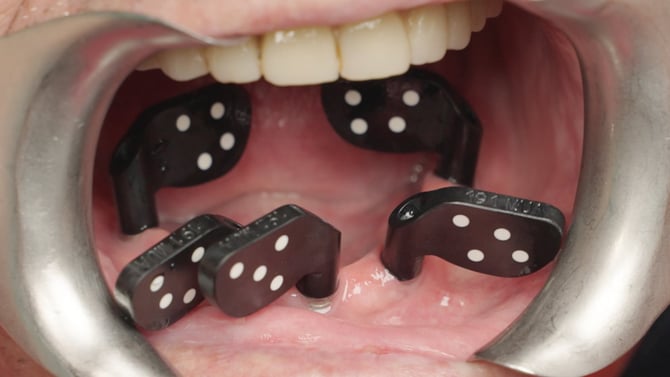
Step 1
- The PIC transfer in position 41 is obscuring the PIC transfer in position 43
- PIC transfers in positions 47, 37 and 34 are enabled as references
- Capture is initiated and information for positions 47, 41, 34 and 37 is gathered
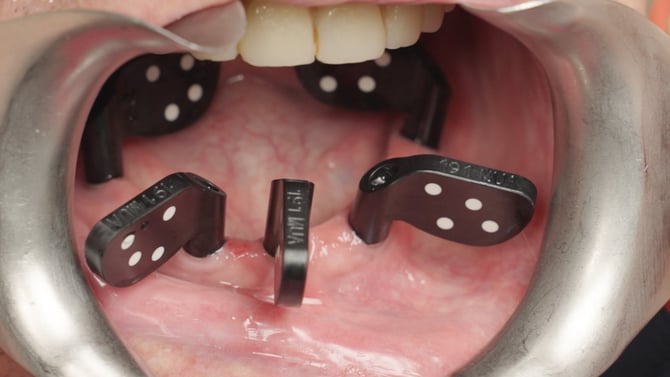 Step 2
- Without exiting the capture, the PIC camera is angled away from the patient's mouth
- PIC transfer 41 is rotated towards the front so that its dots are not visible by the PIC camera
- The PIC camera is angled back to complete the measurement of the PIC transfer in position 43. It no longer needs to "see" PIC transfer 41 as its information was already measured in step 1.